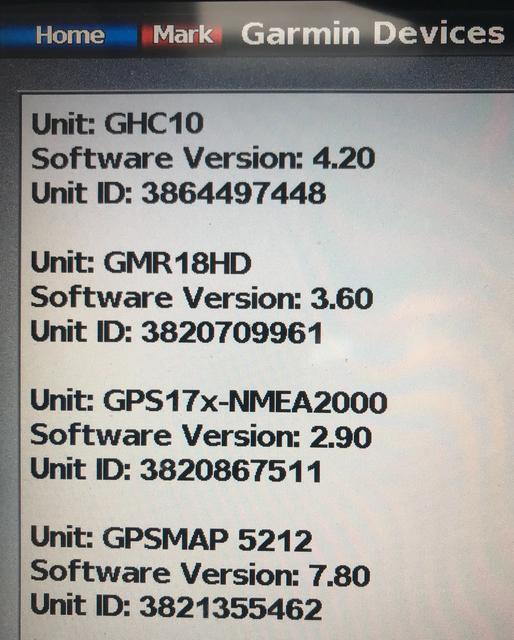
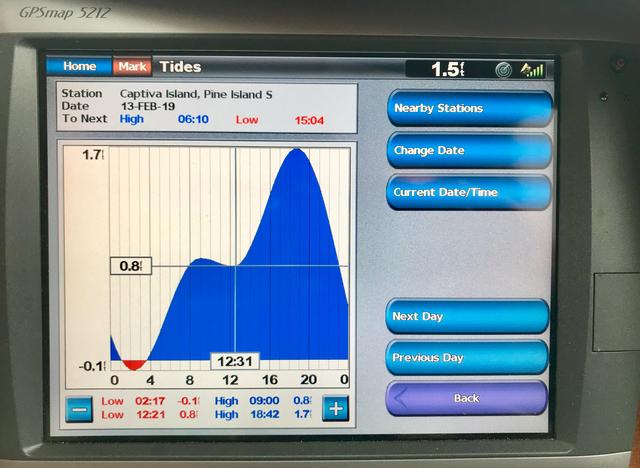
I have a chart update purchased from a Garmin. If I remove the update chart SDcard, tides work. Reinstall the card, no tides.
Here is the link Garmin sent me:
With a SD card inserted into the reader on your Windows computer visit
https://static.garmincdn.com/com.garmin ... 181101.zip
Download the .zip file (or download from the link above
Unzip (or extract) the folder to a known location
Open the now Unzipped folder
Locate the file named GPS17_20181101.exe
Double-click the file that was saved in the previous step
If the message “Windows Protected your PC appears, then select “more info” followed by “run anyway”.
If the message "This publisher could not be verified. Are you sure you want to run this software?" appears, choose the Run button,
A new window will appear called Marine Product Software Update
Click Next
Select the drive letter corresponding to the SD card reader
Click Next
The update will now be installed to the SD card
Once the installation is complete, click Finish
Installing the Update
Power on the device
Choose "I Agree" when the Warning screen appears
Insert the SD update card into the device
Choose Update Software
The update will begin, updating the connected device as well as any other compatible accessories or devices present on the NMEA 2000 or Garmin Marine Network.
IMPORTANT: Do not remove the software update card until the device fully reboots and "I Agree" has been selected on the Warning screen. Removing the software update card before the process has finished may corrupt the operating system and may cause the device to become inoperable.
*If current software version is below 4.10, a 2 GB SD card will be required. This applies to 400, 500, 4000, 5000 series devices.
Stuart Bell
Ranger 25: Shearwater
(561) 352-1796