iPad Wishlist

Cocoa Gold

Active member
Joined
Mar 10, 2012
Messages
26
Fluid Motion Model
C-24 C
Non-Fluid Motion Model
Ranger 31
Vessel Name
Cocoa Gold
We are planning to purchase our first iPad and it will be dedicated to the Tug to hold iPad Apps/data dedicated to her needs, at least at the beginning.

Our tech./ computer purchase philosophy over the years is buy as big as we can afford and thus our various Thinkpads have lasted us many many years because as programs increased in size we had the room and the RAM.

Never having owned and iPad I need some guidance.

What would be on your wishlist storage wise? We plan to download charts, Apps and ? ...

What would you recommend that would be helpful on such a dedicated iPad ? App and program wise ?

Being a newbie I'm not sure about what word processing programs are available as well as exterior keyboards etc. Any advice on that would be appreciated as well.

Alice
 
Make sure you get one with 4G capability otherwise when there is no Wi Fi you will not have GPS..

I have both Garmin and Navionics.. They are both very good..

Wilkie
 
We bought an iPad 2 almost 2 years ago that I use for i-books, internet and on the road/water, navigation apps, RV Park and driving map apps. The iPad has internet that we link, while at home and or on our boat to a router served by Verizon, when we need internet. The iPad is the 32GB model. We have the Navionics HD US app that covers all waters in the US, ICW, inland, Great Lakes,etc. It requires that I be connected to the internet when I'm downloading anything, like a detailed chart of say Lake Powell on the Navionics app. However once a chart is downloaded I do not need to be conected to the internet for the built in GPS to navigate along while on Lake Powell. You only need to download a map section the one time, not ever time you want to access that particular map. Navionics is wise in that once you have purchased and downloaded the app you then only download what area you're wanting to view or navigate on (at no additional cost). This way your iPad isn't filled with charts and taking up memory for places you don't intend to use, only ones you intend to research or use. With that said we have never had an issue with storage space at 32GB. Checking my storage I see we've used 4.6GB and have have 23.9 available, I guess I better go download something!

Jim F
 
I bought the ipad being celular capable. It costs $100.00 more, but I figured I would hedge my bet in the event wifi coverage was not efficient I could always get a data plan. So far I have not needed the data plan. I can use my iphone as a hotspot, plus I also have a wifi card. So we are fairly covered no matter where we are.
 
All my geek friends say the same thing: buy the fastest computer with the biggest storage you can afford. This extends the life of the machine because it is not as easily overwhelmed by increasing demands for processor speed and storage. That said, my wife is still using our old iPad 1 (creaky technology) for basic stuff.

We use our iPad with the retina display all the time. If you are going to watch movies on it and play lots of music, more storage is better. Otherwise you can get by with the smaller storage option. But the features that I am genuinely glad I have is the LTE cellular plan and GPS. I use the iPad all the time on the water.

Jeff
 
Wait a little while....the next version is reportedly gonna have 128GB of storage. It is amazing how fast you can consume memory. Of course, there is the "always wait for the next version" syndrome.....

Also, consider the Bad Elf GPS that works seamlessly with the i-devices. Belt, suspenders, extra belt.
 
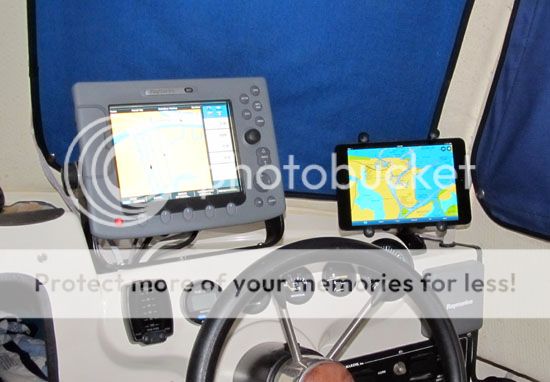
We started using the iPad on the boat shortly after it first came out. We are still using that iPad and have added an iPad Mini to the mix. Since we were early users (and blogged about it), there have been many questions. Over the years, I have answered some of the same questions over and over, so now I refer folks to various blog posts. Here is one from last fall...

http://captnjim.blogspot.com/2012/09/ip ... again.html

The key thing in your selection of "Which iPad do I buy?" is to get one that is cellular capable - even if you never intend to connect it directly. The models with the 3G/4G capability are the only ones with a built-in GPS chip. We currently use my Droid phone as our only wifi hotspot, so have never connected either iPad directly via the cellular carrier.

If you buy the iPad just for the navigation and other boat related apps, you will soon find MANY other uses for the iPad. The more we use ours, the more uses we find. My wife doesn't carry a laptop anymore when we travel, relying completely on the iPad for her computer needs.

Regarding storage, we both have 32gb models, and have not found that to be limiting. Neither of us are storing videos, but we both have some music and photos. As apps and websites grow in size, we are finding that some (the Garmin nav app, for example) are not compatible with the first generation iPad due to RAM type memory lacking... looks like we will be replacing that unit before long. After 3 years with that unit, she still has 18gb of storage available.

Best wishes,
Jim B.

FrontMountBoatE.jpg
 
Hydraulicjump":2eqrgieo said:
All my geek friends say the same thing: buy the fastest computer with the biggest storage you can afford. This extends the life of the machine because it is not as easily overwhelmed by increasing demands for processor speed and storage....snip...

Jeff

This is good advice IMO. Typically, ones use of a computer such as the iPad increases over time and you cannot forecast your future needs with any certainty... and these needs typically will require/demand more computing resources.

When we're on the water we have our iPad Wi-Fi+4G for 1st Mate and a 13" MacBook Air for me... plus our iPhones. 😎
 
Back
Top