Tablet Based GPS/Chart Plotter Experience

lproulx

Well-known member
Joined
Apr 14, 2018
Messages
199
Fluid Motion Model
C-24 C SE
Vessel Name
Red Owl
Has anyone had any experience, good or bad, with a tablet based chart plotter, using a gps receiver that plugs into the USB port? I am considering a dedicated chart plotter, but the concept of achieving what appears to be as good or better functionality (certainly bigger screen) for $79 is appealing.

Thanks
Larry
 
It’s my understanding that for years any device that has cellular capability must include GPS functionality. In the past I have used Windows laptops with an external GPS antenna and plotting software in addition to onboard plotters. Currently I use my iPad with iNavx for all my route planning, but my onboard Garmin plotter while underway. If pressed though, I could navigate with just the iPad. I’m buying a newer 27 and look forward to Garmin’s integration of Active Captain with the newer MFD.
 
they can work great. - surface pro running coastal explorer or opencpn is a great solution with an external USB puck.

your biggest issue is the ruggedness of these devices compared with proper plotters. that include sealed internals to stop corrosion.

this is why many switch to a raspberry pi or lower power sealed PC running the software plugged into a separate screen.

some folks have successfully navigated ocean journeys with an ipad. not sure I would...

what does your $79 cover? the usb puck only?
 
I have been using an iPad as an additional nav aid since the model with cellular was first released... back when many people (including the "geniuses" at the Apple Store) said it wouldn't work. Combined with a decent marine navigation app (my choice is Navionics), it gives much of the same information as a fixed chartplotter.

That said, it isn't "marinized" AND the the app makers are quick to point out that it "shouldn't be used for navigation." :roll:

If your tablet doesn't have a built-in GPS chip, you'll need an external GPS to pair with it. I also recommend 12v power for the tablet while using it for navigation, since that is a power intensive app. You'll need a secure way to mount it so it doesn't crash and burn while you are underway - my choice for that was a RAM mount.

Even with that, I used the various iPads as a back-up to my dedicated chartplotter. I have used iPads and phones as an aid to navigation on the commercial boats I've driven, allowing a "close and far" view in conjunction with a chartplotter.

I did use Navionics on a Droid phone back in the day, but prefer the iOS universe - so, no current usage with a non-iOS tablet.
 
I do the companion situation quite a bit. with my iphone plus running a broader map view of the journey -say Seattle to San Juans) with the chart plotter zoomed in on specific hazard details.
 
Cutwater28GG":z2xp3c11 said:
- surface pro running coastal explorer or opencpn is a great solution with an external USB puck.

Cutwater: I have a Surface Pro 3 with Windows 10 and have also been experimenting with OpenCPN. I'd like to use it just as a back-up to the Garmin 5212 chartplotter.
I'd like to get a USB puck GPS antenna; which one do you use?
I heard that there are driver issues with some GPS units and Windows 10; what can anyone recommend that works for Windows 10?
 
I got the Garmin GLO Portable GPS from Amazon to use with my Ipad mini. The Garmin GLO is a bit pricy but works well. Also got the friction pad.

I haven't tried it with anything other than an Android Galaxy S4 phone and the IPad Mini.

https://www.amazon.com/gp/product/B00AY ... UTF8&psc=1

Good Luck,
Bob
 
YukonRon":2pzde7ca said:
Cutwater28GG":2pzde7ca said:
- surface pro running coastal explorer or opencpn is a great solution with an external USB puck.

Cutwater: I have a Surface Pro 3 with Windows 10 and have also been experimenting with OpenCPN. I'd like to use it just as a back-up to the Garmin 5212 chartplotter.
I'd like to get a USB puck GPS antenna; which one do you use?
I heard that there are driver issues with some GPS units and Windows 10; what can anyone recommend that works for Windows 10?

I bought this one a while back: no issues.

https://www.amazon.com/gp/product/B008200LHW/ref=oh_aui_search_detailpage?ie=UTF8&psc=1

with a fiddle installed on the dash and a power lead run from the 12v you can power the surface all day
 
The other item to know Is that IPAD is no good in direct sunshine.
 
CJSRQ":2frgs9m3 said:
The other item to know Is that IPAD is no good in direct sunshine.

If you are laying on the beach in direct sunlight, trying to read an e-book on an older iPad, I can see where you might want to tilt it. Based on 8 years of using an iPad in a cabin type boat, I have not run into any issues with being able to see/read a nav app on the iPad.
 
I've used the Navionics HD USA and Canada on iPad Air for several years.
It's been a good companion chartplotter to the built-in Garmin and allows us to:
- zoom in and out rapidly
- check out portions of route ahead
- check marina availability ahead
- using distance function can rapidly mark a distance from a certain land or sea-based point
- route planning at night at anchor or docked

the iPad air has built in GPS, and can operate outside of cell service, but must have wi-fi or cell to update map data.

It's not the do-all, end-all, but a good companion to the Garmin; and like the Ford/GM/Dodge truck debate, a matter of personal preference.

Most places the data matches spot on, but there have been occasional instances where depths and obstructions have actually been a mean between the Garmin and Navionics data, so be wary.

I've had good luck using a RAM suction base with an X-Grip mount to position the unit above the helm attached to the windshield. Also good spot to keep plugged in to 12vdc charging outlet.
 
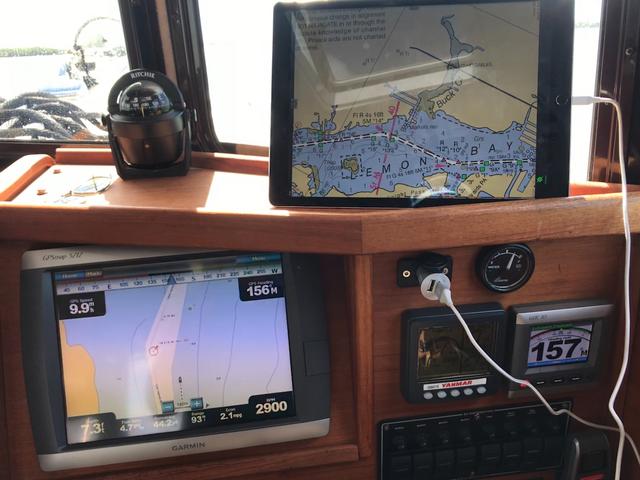
I'm in the early stages of using an iPad for navigation. On my recent Florida Gulf Coast cruise, I used SEAiq USA on an iPad Pro with the 12.9' display along with my Garmin 5212 chartplotter. SEAiq uses NOAA raster charts that look just the same as paper charts. A terrific feature is that the charts are FREE and updated every time NOAA updates them so you always have current charts. An internet connection is required to update, but the charts are resident on the iPad so while you're out on the water and away WiFi or cell coverage no internet connection is needed. Another great feature is that the charts are quilted together so you don't have to jump from one chart to another. When zooming in and out, the charts change scale and seamlessly switch between charts as needed when panning. Here's what my nav setup looked like:

2_C9938_D4-_B98_D-4791-9_F0_F-26_F7_A2182423.jpg


In this photo, the iPad is showing just the chart. SEAiq will display vessel position on the chart if a GPS is paired with the iPad. I had a Dual XGPS150 Bluetooth GPS with me, but I didn't have it paired to the iPad when this photo was taken.

SEAiq also integrates Active Captain data on the chart, but as of May 23rd Garmin is changing the way the data is formatted and, unless SEAiq makes some changes to the program, the Active Captain data won't update . Another iPad navigation app, Aqua Map, is planning to do the work necessary to display Active Captain so if SEAiq declines to do so, I'll probably switch to Aqua Map. Until then, I'll stick to SEAiq.
 
Reportedly, Active Captain will be added to the Navionics app by year end.
 
As several other have already indicated, we use a tablet as secondary but for a different reason. Navionics USA has a feature called "sonarchart" that displays bottom contours in much more detail than NOAA charts. On an Android tablet with built in GPS it's a handy supplement for fishing and a backup nav device. In our case it is tertiary backup, laptop/coastal explorer primary, Ray C-120 chartplotter secondary, and tablet tertiary. But based on what I've seen so far I wouldn't hesitate to use the tablet for navigation.

Just as with the laptop, the tablet is already aboard for other purposes. So it might as well be drafted into whatever service it is capable of providing.
 
Back
Top