Yamaha Engine Display Trim Bar Indicators

pdo

Well-known member
Joined
Dec 27, 2020
Messages
82
Fluid Motion Model
C-288 C
Vessel Name
Selah
I have a 2021 R-23 with a Yamaha 200 HP. I have noticed recently that the engine trim display bars on the engine monitoring screen often shows that the engine is trimmed up a bar when underway, even when I have assured that the engine is fully trimmed down (from the toggle on the engine itself). In other words, instead of showing one bar (engine trimmed in/down completely) two bars show when underway. When I slow to idle speed to engine display then shows only one bar. Anyone else have this issue or know what the cause might be? Thank you
 
I have a 2020 R23, and have the exact same "issue". I've never much worried about it, as I figured it might be a level indicator and/or accelerometer (or some such thing of which I am not an expert :mrgreen: ) that is affected by the bow-up attitude whilst underway.

But now that it's mentioned... I'm curious if anyone has insight?
 
Brian98133":jzmrx0g3 said:
I have a 2020 R23, and have the exact same "issue". I've never much worried about it, as I figured it might be a level indicator and/or accelerometer (or some such thing of which I am not an expert :mrgreen: ) that is affected by the bow-up attitude whilst underway.

But now that it's mentioned... I'm curious if anyone has insight?

Glad to know someone else has experienced this! Hope we can get some insights. Maybe someone from Ranger Tugs factory may be able to shed light on this.
 
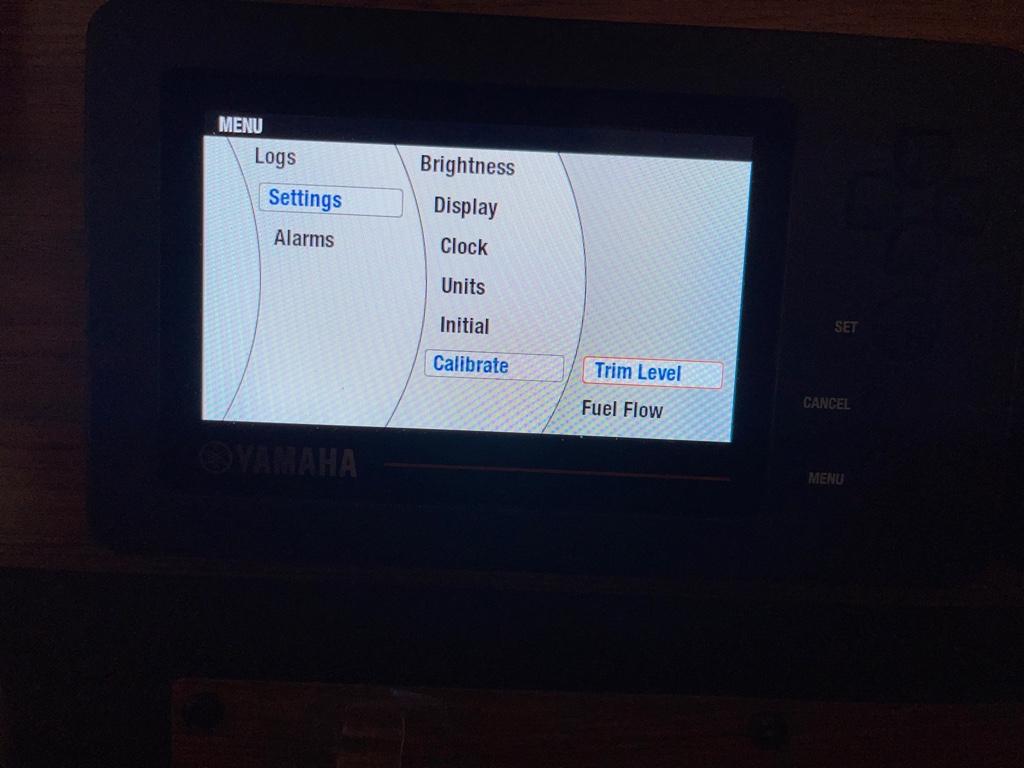
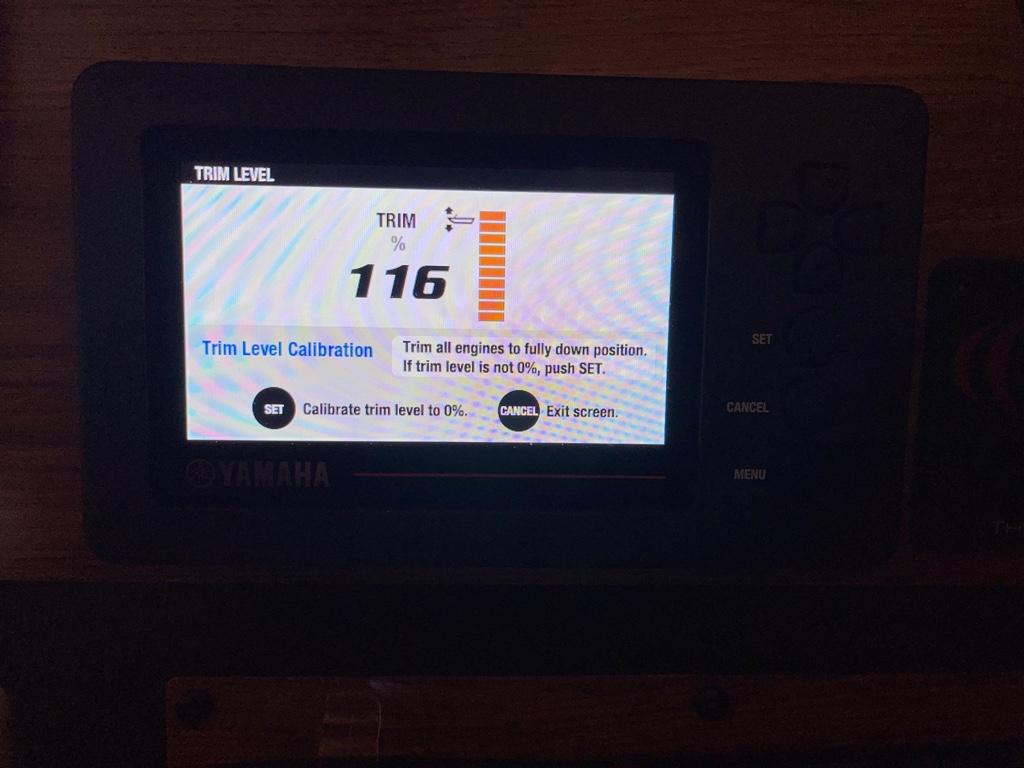
Easy fix. Go to Menu/Settings/Calibrate/Trim Level and follow the instructions. Probably the easiest thing you will ever fix on your boat.
ad688e1ebd216ba2163472026cdfc05c.jpg

b278a67211ec99c17bd227fa16f18b87.jpg


Sent from my iPhone using Tapatalk
 
Good tip CruisingER. We've had an issue on our 2018 R23 with the Yamaha display. The fuel gauge has always been inaccurate. It doesn't really rise and fall with the actual fuel level. Is there a fix for it?

Peter
 
As someone who was on an extended cruise and pulled into the Coinjock, NC marina with one bar flashing (Took on 72 gallons of fuel - too close for comfort) I understand your frustration.

I’ve not found a fix for the fuel gauge fluctuation. It’s caused by the bow rise when underway. I really only look at it when idling or stopped. Underway, the gauge is inaccurate.


Sent from my iPhone using Tapatalk
 
Interesting. Mine went from one bar at delivery to three bars. My mechanic said it wasn’t an issue but have also been worried about challenges getting out of the hole. I’m going to ask my mechanic to look at it one more time to make sure the engine or swim pod have not shifted these past three years, and if all is well, will reset the gauge as mentioned above. Thanks. Glad to see it isn’t just my boat.
 
I have found that if I have more than myself and my better-half onboard, the extra weight of add'l guests makes it a bit challenging to get 'er up and out of the hole as well. Since I know that the F200 is all the way down even when it shows 2 bars, I know it's not a motor trimming issue.

Once I heeded advice to push the trim tabs down before attempting the hole-shot, the issue no longer exists. She steps right up on plane, even with some extra weight. Kinda wish I had thought to upgrade to a 225 when we had her built! I feel like another 25HP might just keep her from feeling sluggish getting out of the hole :mrgreen:

Regarding the fuel gauge: I found I now only rely on the "gallons used" portion of the Yamaha display. I reset it religiously every time I fill up (it only works super well when filled completely). So far it's been flawless. Each time I top-off, it's within a half gallon of what I had expected based on the Yamaha display.

I will be trying that trim calibration technique! Hope that gets rid of my "Two Bar-Itis" :lol:
 
Thank you @CruisingElvinRay . Tried your remedy today and easy peasy it was. Seemed to fix the issue, at least today. Hope it has resolved it for good! Appreciate the help greatly!
 
Brian98133":104vil7l said:
I have found that if I have more than myself and my better-half onboard, the extra weight of add'l guests makes it a bit challenging to get 'er up and out of the hole as well. Since I know that the F200 is all the way down even when it shows 2 bars, I know it's not a motor trimming issue.

Once I heeded advice to push the trim tabs down before attempting the hole-shot, the issue no longer exists. She steps right up on plane, even with some extra weight. Kinda wish I had thought to upgrade to a 225 when we had her built! I feel like another 25HP might just keep her from feeling sluggish getting out of the hole :mrgreen:

Regarding the fuel gauge: I found I now only rely on the "gallons used" portion of the Yamaha display. I reset it religiously every time I fill up (it only works super well when filled completely). So far it's been flawless. Each time I top-off, it's within a half gallon of what I had expected based on the Yamaha display.

I will be trying that trim calibration technique! Hope that gets rid of my "Two Bar-Itis" :lol:

How do access the gallons used?
 
Have to go off of memory here, since I'm not at the boat. But basically, hit the "Menu" button, which will default (at least on mine) to "Logs"... arrow over to "Trip" and hit "Set".

You will then be in a screen that shows "Used" (or 'gallons used', I can't remember), "Distance", "Hours" and "Total Hours".

Each line can be individually 'reset' to zero, or you can 'reset all'. I imagine the "Total Hours" won't reset with 'reset all'... but I didn't want to try. I reset each the first 3 lines individually.

Knowing we have roughly 80 gallons (or 75, depending on where the info came from), once I've reset my "Used" to zero, it's easy to track.

Again... this is from aged memory.... :mrgreen:
 
Brian98133":32mmqmc5 said:
Have to go off of memory here, since I'm not at the boat. But basically, hit the "Menu" button, which will default (at least on mine) to "Logs"... arrow over to "Trip" and hit "Set".

You will then be in a screen that shows "Used" (or 'gallons used', I can't remember), "Distance", "Hours" and "Total Hours".

Each line can be individually 'reset' to zero, or you can 'reset all'. I imagine the "Total Hours" won't reset with 'reset all'... but I didn't want to try. I reset each the first 3 lines individually.

Knowing we have roughly 80 gallons (or 75, depending on where the info came from), once I've reset my "Used" to zero, it's easy to track.

Again... this is from aged memory.... :mrgreen:

Thanks for the information!
 
Regarding your trim indicators, it may be a good idea to take a look at your trim sensor, which is the device sending info to the gauge. The sensor is a plastic lever located on the inside of the starboard engine bracket. It's mounted with two screws and the lever rotates around another screw. I'd check to make sure that the screws are tight and the lever is intact with no debris on it. If you lock your motor up at full tilt, the trim sensor will be directly below the tilt lock.
 
Pandion":2mcf7jwi said:
Regarding your trim indicators, it may be a good idea to take a look at your trim sensor, which is the device sending info to the gauge. The sensor is a plastic lever located on the inside of the starboard engine bracket. It's mounted with two screws and the lever rotates around another screw. I'd check to make sure that the screws are tight and the lever is intact with no debris on it. If you lock your motor up at full tilt, the trim sensor will be directly below the tilt lock.

Great info! Did not know this! Thank you! 😀
 
Help! I broke the rule about "if it ain't broke don't fix it" my trim level always worked perfectly then I calibrated the trim level and now my trim doesn't work. It just stays on 1 bar. Any suggestions?
 
Back
Top